Exporting Excess Solar Energy to the Grid
Understand the SP buyback process, bidirectional meter readings, and how your solar exports affect your bill.
Table of Contents
- Basic Theory of Exporting Excess Energy
- Overview of Energy Export Process
- Fimer - AuroraVision Dashboard Overview
- Fimer - Monthly Generation Breakdown
- SOLARGAGA - GagaHub System Overview
- SOLARGAGA - GagaHub Daily & Cumulative Generation
- SP Meter Installation Timeline
- Understanding the Bidirectional Meter (Net Meter)
- How Energy Flows
- Interface Readings: Overview
- Interface Reading: 1.8
- Interface Reading: 2.8
- Export Energy Pricing
- Imported Electricity on Low Solar Days
- SP Rebate and Bill Offset
- Example of an SP Rebate Letter
Basic Theory of Exporting Excess Energy
After installing your solar system, you must submit a form to Singapore Power (SP) to regulate the selling of excess energy. This registration ensures that your exported energy is properly credited and compensated.
Overview of Energy Export Process
Once registered with SP, any excess solar energy is automatically exported to the grid. The system is designed to seamlessly switch between self-consumption and export without manual intervention.
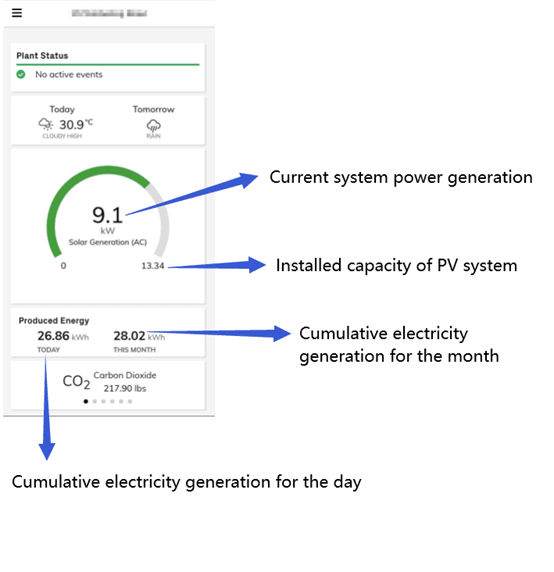
Fimer - AuroraVision Dashboard Overview
The image below shows an overview of the Fimer (AuroraVision) monitoring dashboard.
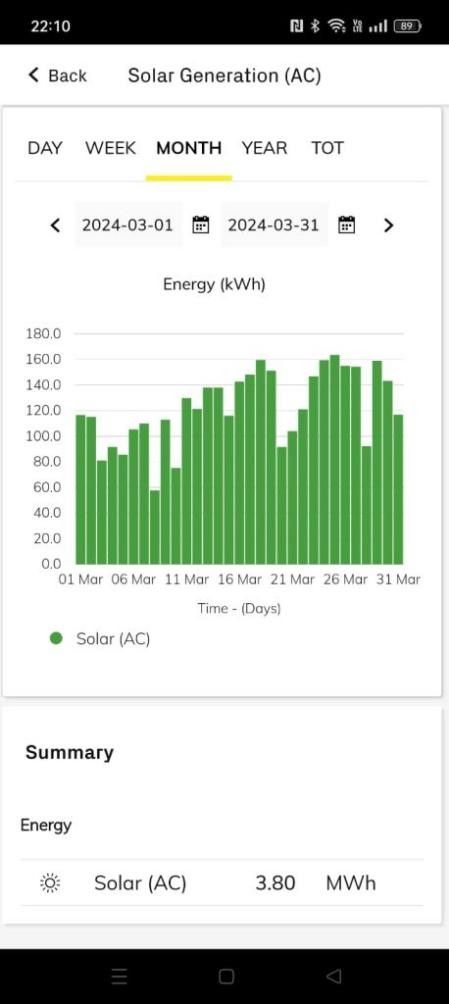
Fimer - Monthly Generation Breakdown
The image below displays monthly solar generation data for a 30kWp Fimer system.
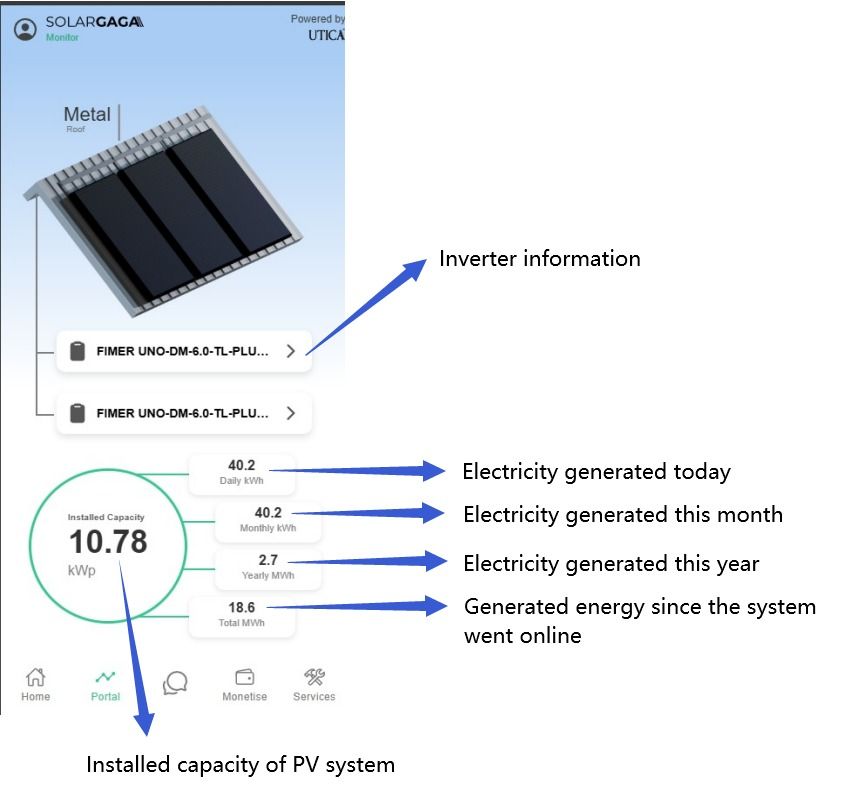
SOLARGAGA - GagaHub System Overview
The image below shows the system overview on the SOLARGAGA GagaHub platform.
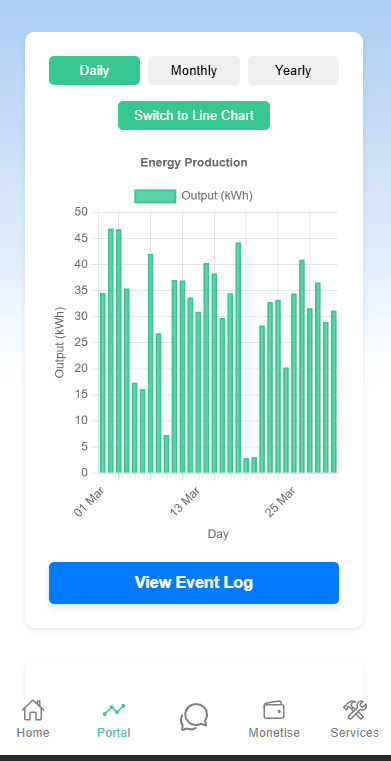
SOLARGAGA - GagaHub Daily & Cumulative Generation
The image below displays daily and cumulative solar generation data on GagaHub.
SP Meter Installation Timeline
-
For SP (main) customers: approximately 1 month after installation for bidirectional meter setup and testing (excluding weekends and holidays).
-
For OEM retailers (e.g., Geneco, Keppel): expect 6–8 weeks due to coordination with SP. [Only SP technicians are authorized for AMI or net meter installation.]
Understanding the Bidirectional Meter (Net Meter)
The bidirectional meter tracks both electricity imported from and exported to the grid. It automatically switches between using solar energy and drawing power from the grid, ensuring a seamless energy flow.
How Energy Flows
-
Solar energy powers your home during the day
-
Excess solar energy is automatically exported to the grid
-
When solar generation is insufficient, the grid supplements your energy needs
Interface Readings: Overview
The interface displays key readings that monitor your solar system's interactions with the grid. It provides data on both imported and exported energy.
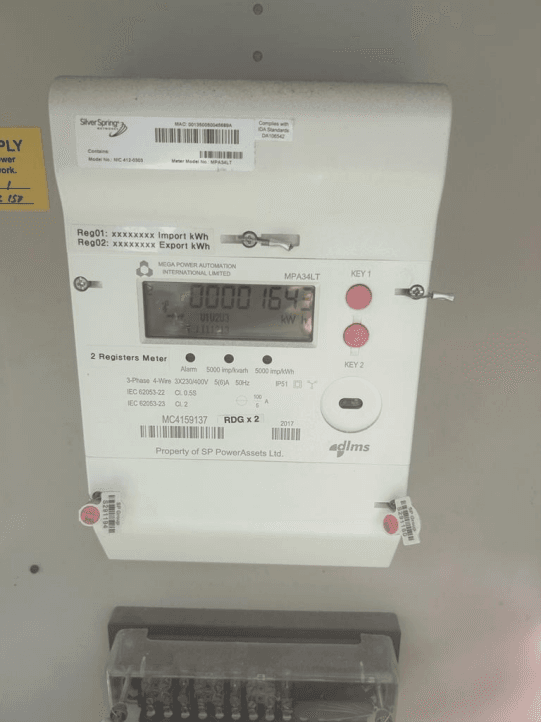
Interface Reading: 1.8
This reading indicates the total electricity imported from the grid to your home.
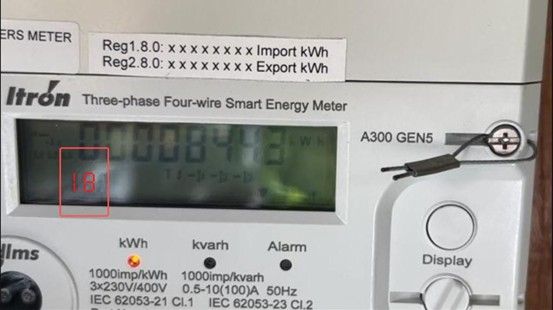
Interface Reading: 2.8
This reading indicates the total excess electricity exported from your solar system to the grid.
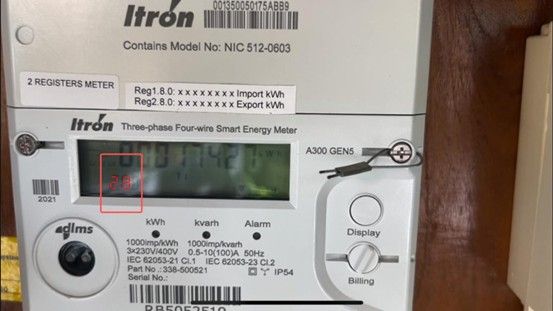
Export Energy Pricing
-
SP fixed rate: S$0.2364/kWh, offering the highest and most stable rate.
-
Other retailers: Rates vary based on the Wholesale Uniform Singapore Energy Price (USEP), typically ranging from S$0.10 to S$0.19/kWh, updated every 30 minutes.
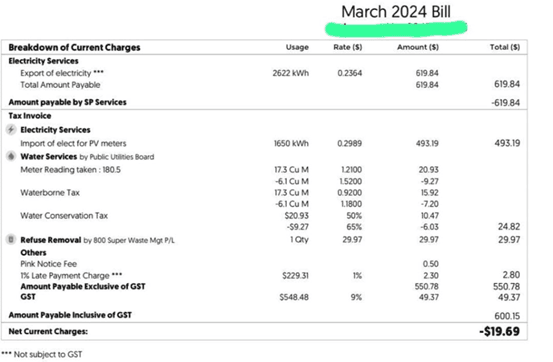
Imported Electricity on Low Solar Days
When solar generation drops due to cloudy or rainy weather, your home automatically draws electricity from the grid. Note that the electricity tariff will vary depending on your retailer contract.

SP Rebate and Bill Offset
-
SP applies your exported energy credits to offset your entire bill, including utilities such as water
-
Unused export credits roll over to the next billing cycle
-
Non-SP users (e.g., Geneco, Keppel) will receive a rebate letter by post approximately 2 weeks after billing
Example of an SP Rebate Letter
The rebate letter summarizes your exported energy and details how it is credited toward your SP bill.