Error Codes and Warning Lights
Learn how to identify and respond to common error codes and warning lights on your solar inverter. This guide explains the most frequent inverter alerts in Singapore, what they mean, and the right steps to take for each.
Table of Contents
Understanding Inverter Warning Lights and Alerts
Solar inverters use indicator lights and codes to communicate system status or faults. Common light colors include:
-
Green: System is operating normally
-
Yellow or amber: Warning or irregularity
-
Red: Error or system fault
Some inverters also display text-based error codes or blinking patterns that indicate specific issues. It’s important to understand what these signals mean before taking action.
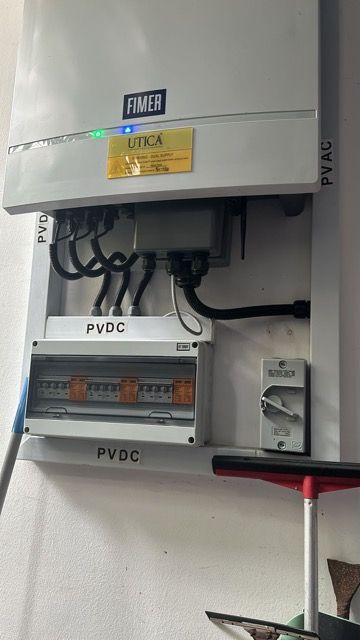
Common Inverter Error Codes and What They Mean
Here are common error codes you may encounter in Singapore:
-
Grid Fault / Grid Voltage Out of Range: Unstable power from the grid
-
DC Overvoltage: Too much input from solar panels
-
Ground Fault: Leakage to earth
-
No Grid / Grid Lost: Grid connection was interrupted
-
Temperature Warning: Inverter is overheating
Each manufacturer may label these differently, so check your user manual for the exact meaning based on the code.
What to Do When You See a Warning or Error
If you see an error code or blinking red/yellow light:
-
Take note of the code or pattern
-
Refer to the inverter manual or mobile app for interpretation
-
Check for external causes like blackouts or system overloads
-
Avoid switching the inverter on/off repeatedly. This may worsen the issue If it’s a temporary condition (e.g., grid fluctuation), the inverter should reset on its own once the condition stabilises.
Issues Requiring Immediate Attention
Call a technician immediately if:
-
The error persists for more than 15 minutes
-
There’s a burning smell or abnormal heat
-
The same fault repeats frequently (especially ground or grid faults)
-
The inverter shows multiple errors at once Some faults, such as a ground fault, may indicate safety risks.
Never attempt to reset the inverter if you suspect a hardware issue.
When to Wait and Monitor
Some inverters are designed to automatically retry or reconnect after a fault:
-
Grid faults may resolve once SP Group supply stabilises
-
Temperature warnings may clear once shade or airflow improves
-
Startup delays may appear in the early morning due to low light In these cases, observe the system for 10–20 minutes
-
If the light switches back to green and power resumes, no further action is needed.
Preventing Error Recurrence
To minimise future warnings:
-
Ensure good ventilation around the inverter
-
Avoid overloading the solar circuit with new panels beyond design specs
-
Schedule annual firmware updates and inverter servicing
-
Install surge protection to reduce lightning-related faults
-
Monitor performance using the manufacturer’s app to catch irregularities early
Preventive maintenance helps detect potential failures before they escalate.