DC Isolator Switch
Learn how to identify and resolve tripping issues caused by the DC isolator switch in your solar PV system. This guide explains the DC isolator’s role, how to troubleshoot a tripped switch, safety warnings, and maintenance tips specific to Singapore’s climate.
Table of Contents
- What is a DC Isolator Switch?
- What Happens When the DC Isolator is Switched Off or Faulty?
- Causes of DC Isolator Issues
- How to Inspect and Reset a DC Isolator Safely
- What to Check After Resetting the Isolator
- When NOT to Touch the DC Isolator
- Compliance and Safety Guidelines in Singapore
- Preventing Future DC Isolator Issues
What is a DC Isolator Switch?
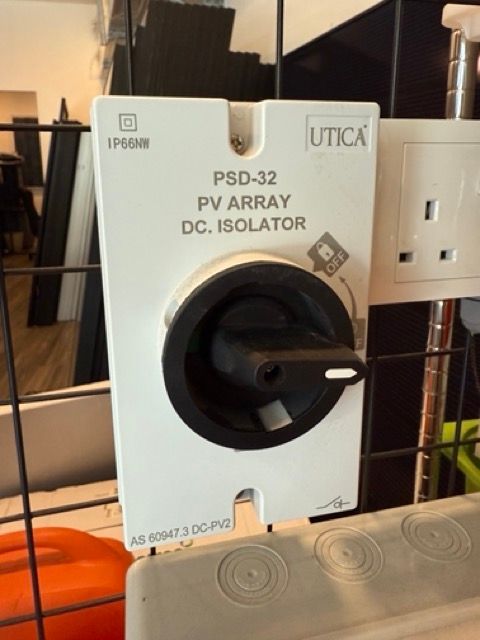
A DC isolator switch is a manual disconnection device installed between your solar panels and the inverter. It allows for safe maintenance or emergency shutdown of the DC (direct current) flow from the PV array. In Singapore, it is commonly mounted near rooftop inverters or at the side of landed homes. It is not meant to trip frequently but if it does, this indicates a serious issue with the solar array or inverter input.
What Happens When the DC Isolator is Switched Off or Faulty?
If the DC isolator is switched OFF or becomes faulty, your inverter will not receive power from the solar panels. In most systems, this is indicated by a blinking yellow fault light on the inverter.
Power generation stops completely because the connection between your solar panels and the inverter is broken. DC isolators do not trip automatically, but issues such as internal faults or water ingress may interrupt power flow and trigger the inverter's fault indicator.
Causes of DC Isolator Issues
These are the most common causes of DC isolator issues in Singapore:
-
Water ingress from heavy rain or poor IP-rated sealing
-
Corrosion due to constant humidity and UV exposure
-
Loose terminal connections inside the isolator or inverter
-
Heat buildup from direct sun exposure
-
Aged or cracked switch components from environmental wear
If you hear crackling, see burn marks, or smell melting plastic, turn off your system immediately and contact your installer.
How to Inspect and Reset a DC Isolator Safely
Warning: Never open or reset a DC isolator unless you are trained or advised by a technician. DC current is dangerous.
Step 1: Visually inspect the isolator housing for cracks, water, or heat damage
Step 2: Check if the isolator has been manually turned OFF. If so, and you have been advised it is safe, turn the switch back ON
Step 3: Observe the inverter for a stable light indicator (yellow light should stop blinking if resolved)
Step 4: If the inverter resumes normal operation, monitor the system closely
If issues persist or the switch shows signs of damage, shut down your system and call a qualified technician.
What to Check After Resetting the Isolator
After resetting, check your inverter display or app. You should see:
-
Solar generation values increasing
-
Inverter status showing “Normal” or “Generating”
-
No blinking fault lights If everything appears normal, power is restored.
Monitor the system for at least 15 minutes to confirm stability.
When NOT to Touch the DC Isolator
Do NOT touch the DC isolator if:
-
You see melting, burn marks, or scorched areas
-
Water or condensation is present inside the box
-
The inverter continues to show a fault after reset
Call your solar provider or a licensed technician immediately. Faulty DC isolation can lead to arcing or fire hazards if not addressed.
Compliance and Safety Guidelines in Singapore
In Singapore, DC isolators must comply with SS 638 electrical safety standards. Outdoor units should be weatherproof (minimum IP65 rating) and UV-resistant. SP Group may conduct inspections on installed solar systems. Always use certified solar contractors for replacement or upgrades to ensure compliance.
Preventing Future DC Isolator Issues
To maintain safe and efficient operation:
-
Install the isolator in a dry, sheltered location when possible
-
Use proper sealing and cable glands for weatherproofing
-
Have your installer check the isolator during annual servicing
-
Replace units older than 5 years or showing physical wear
Preventive maintenance reduces fire risk and ensures long-term performance of your solar system.